Build 90
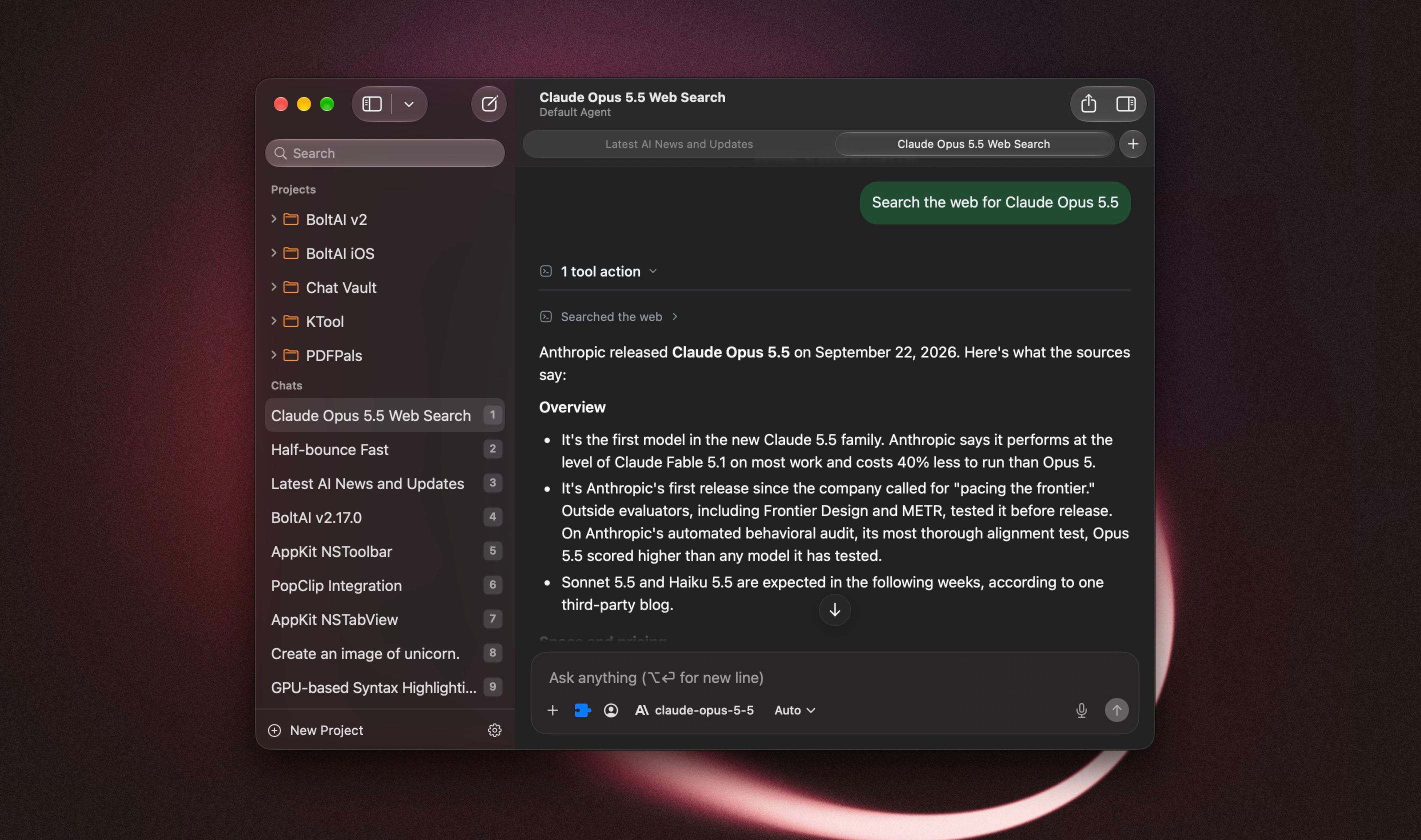
BoltAI now feels more at home on your Mac. The rebuilt chat window brings a native toolbar and sidebar, scrolling that blends into the window, and faster chat switching. This update covers 2.17.0 through 2.17.2, including a fix for a launch crash on macOS 13 and 14.
On macOS 13 or 14 and BoltAI quits right after opening? Download 2.17.2 and install it manually. Here's how.
New
A more native chat window: the toolbar, sidebar search, and window layout fit macOS more closely. On macOS 26, chat content scrolls beneath the toolbar and the inspector blends with its header.
Customize the toolbar with the actions you use most, including Share and one-click PDF export.
Experimental chat tabs: press Command-T for a new tab, or right-click a chat and choose Open in New Tab. Each tab keeps its own place, and you can reopen closed tabs. To try them, go to Settings > Developer > Feature Flags, turn on "Enable native chat tabs (experimental)", then restart BoltAI.
Review and remove duplicate starter prompts, agents, and workflows from your library. BoltAI shows what will be removed before you confirm.
Improved
The reasoning menu next to the model picker now offers Extra High and Max for supported Claude models.
Kimi K3 can now use Low and High reasoning, not only Max, to keep costs down.
Supported Claude models have a larger default response allowance, giving them more room to think and finish an answer. Your custom limits still apply.
Long sessions use less memory, especially with document attachments.
AI Workflows explain capture and permission problems more clearly, help you turn on Accessibility, and let you review an incomplete result.
Unavailable MCP tools stay visible in chat, agent, and project settings, so you can remove them. Deleting an MCP server also removes its tool selections, including on your other devices.
Model pickers keep cached models visible while an updated list loads.
BoltAI no longer offers to install starter prompts, agents, or workflows you already have.
Fixed
Fixed BoltAI crashing at launch on macOS 13 and 14.
Fixed the About window opening by itself at launch on macOS 13 and 14.
Fixed "Hide Dock icon when last window closes" not working reliably on macOS 13 and 14.
Project folders in the sidebar show their orange color again on macOS 14 and 15.
Fixed a crash when stopping a response while it streams, a rare crash in background sync, and a crash when stopping speech playback.
Fixed AI Workflows that insert or copy their result directly failing with "The model returned an empty response" when using Codex CLI. [ref]
Fixed chats failing to send when an MCP server could not load. AI Workflows also continue when a selected MCP tool is unavailable.
Fixed results or errors from an earlier AI Workflow appearing in a later run, and No Preview workflows not completing when run back to back.
Fixed certain AI Workflow requests failing with custom API base URLs.
Saved custom OpenRouter endpoints are now used when loading models and sending requests.
Custom agents keep their selected plugins, and interrupted settings saves no longer show a cancellation error. [ref]
Claude now reports when its response allowance runs out before it answers. [ref]
Answers that fail to save stay visible when you switch chats, and regenerating one no longer brings back later messages.
Documents keep their extracted text if the original file is missing, and chats continue when an attached document can't be read.
Dragged images use the correct format, and attachment-loading failures show an error.
Prompt editor headings and buttons stay visible in their sheets.
Note: AI Workflows need Accessibility permission. If your workflows don't run, turn on BoltAI in System Settings > Privacy & Security > Accessibility, then try again.